

Contacts Journal CRM




Read our comprehensive review of Contacts Journal CRM for Mac. Discover how this professional relationship management tool helps you track client interactions.
A Hands-On Look at Contacts Journal CRM for Mac
Managing professional relationships requires more than just a standard address book. Contacts Journal CRM relationship management software is designed to fill that gap, transforming your contact list into a proactive communication tool. Whether you are handling high-value client accounts or building a personal professional network, this application provides a centralized workspace on your Mac to document conversations, schedule critical follow-ups, and store essential documents.
Instead of relying on scattered spreadsheets or memory, the app allows you to view a complete chronological timeline of your interactions with every contact. This ensures you are fully prepared before every meeting, call, or email exchange.
Core Features for Seamless Relationship Tracking
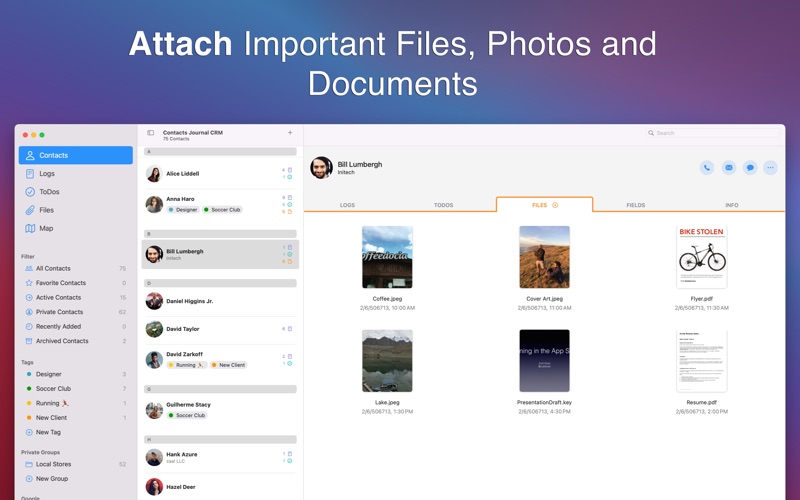
- Interactive Logs, ToDos, and Files: For every contact, you can write detailed meeting notes (Logs), set upcoming tasks and reminders (ToDos), and attach relevant contracts or briefs (Files).
- Company-Level Tracking: You can link multiple individual contacts to a single Company Account, giving you a high-level overview of your relationship with an entire organization.
- Visual Contact Mapping: Plot your contacts on an interactive map. This feature is particularly useful for planning business trips or structuring regional sales visits based on physical proximity.
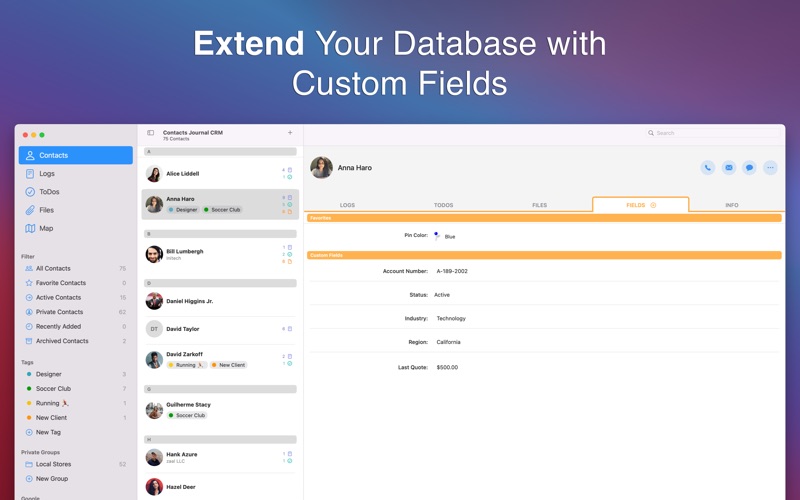
- Advanced Organization: Group and filter your network using custom tags, favorites, and custom fields designed specifically for your unique business workflow.
Who Benefits Most from This CRM?
The Contacts Journal CRM relationship management system is highly optimized for independent operators and small teams who need a robust system without the overhead of enterprise-level software. It is an exceptional fit for real estate agents managing property buyers, freelancers tracking client projects, and sales professionals who depend on consistent follow-ups to close deals.
Importing your existing database is straightforward, with support for direct imports from your Mac's native Contacts app or via CSV files. Additionally, the built-in duplicate detection and merging tool helps keep your database clean and accurate.
Data Privacy and Team Collaboration
A standout benefit for privacy-conscious professionals is that the app requires no external account creation. Your database remains entirely under your control. For teams, the application supports secure, real-time collaboration using iCloud, allowing multiple users to sync shared databases seamlessly.
To experience this powerful organizational tool for yourself, you can find the official download and purchase options on the Mac App Store.